Gamer Management
Gamer Management
Search
Type the Profile name, Full name, Email, or Phone number in the search box to quickly find the desired customers.
Gamer List
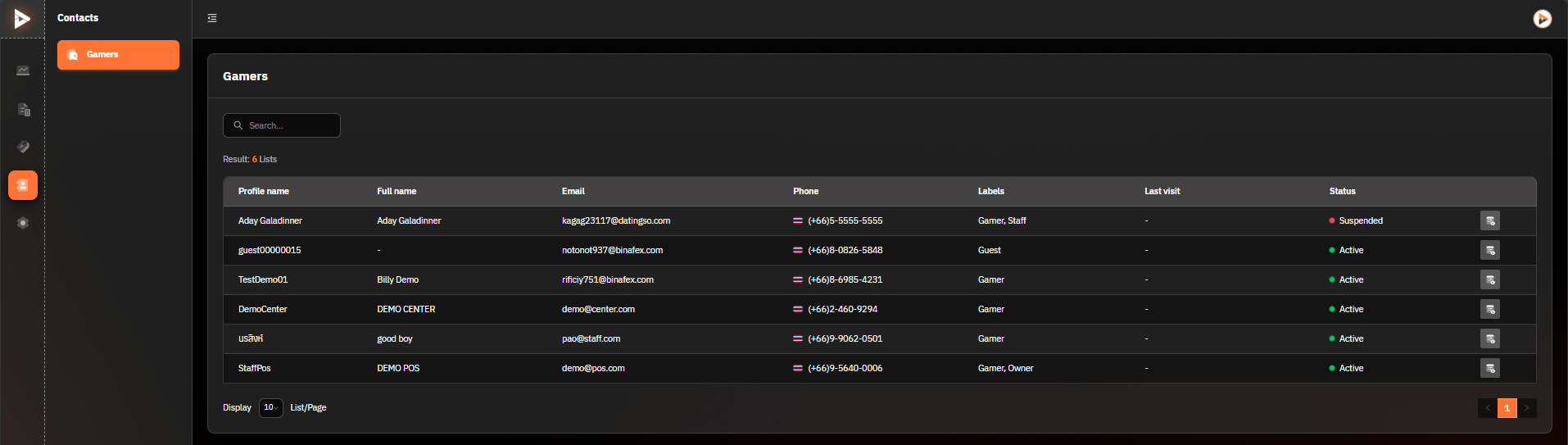
Columns:
Profile name: Customer's profile name
Full name: Customer's full name
Email: Customer's email address
Phone: Customer's phone number
Labels: Customer type, such as Gamer or Guest
Last visit: Date and time of the customer's last visit
Status: Customer's status, such as Active or Suspended.
Actions:
Menu icon (3 dots):
Edit customer information
View usage history
Suspend or activate account
Additional Tips:
Use the search to filter large lists of players.
Check the player's status (e.g., Suspended) to keep track of players who may need troubleshooting.
If a customer comes from another center, they must sign in at the client at least once. However, if it is a new registration at that specific shop, they can use it immediately.
Was this helpful?
Still need help? Ask the team