Dashboard
Dashboard
The Dashboard is a summary page of the current active shift.
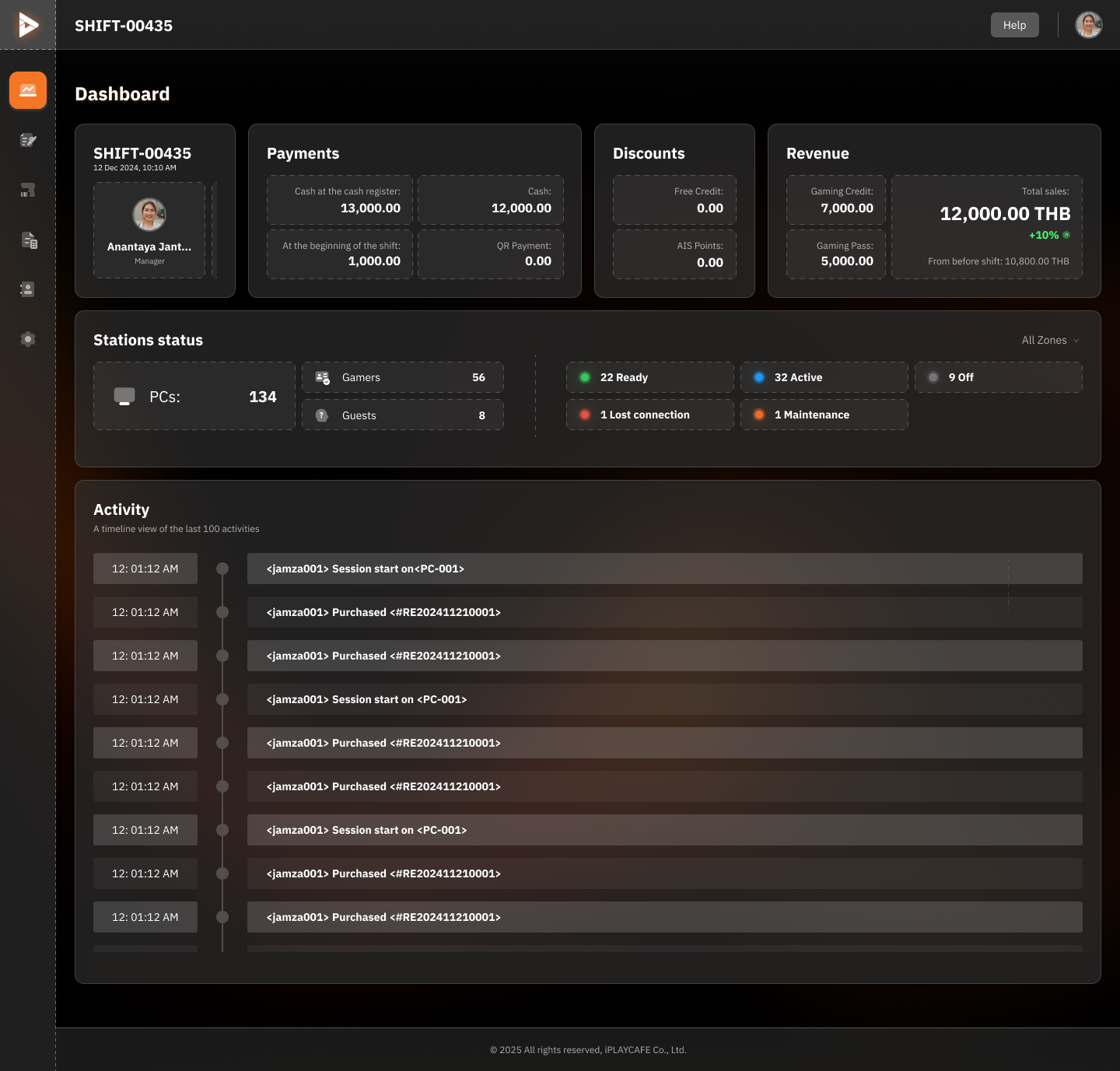
Header
Shift Name:
Displays the shift number, such as SHIFT-00435.
Date:
The date the shift started, such as 12 Jan 2024, 09:10 AM.
Help and Profile Icon:
For accessing user manuals or account settings.
Shift Information
Manager:
Description: Name of the manager working the shift.
Example: Anantaya Jantarasomkiat.
Payments:
Description: Payment details, showing cash on hand and totals from various channels.
Cash: 12,000.00 THB.
Discounts:
Description: Discounts used during the shift (e.g., free credits or loyalty points).
Free Credit: 0.00.
Revenue:
Description: Total revenue received from services, such as Gaming Credit or Gaming Pass.
12,000.00 THB.
Stations Status
PCs:
Description: Number of usable computers.
Example: 134.
Status Breakdown:
Gamers: Users currently playing. Example: 56.
Guests: Unregistered users. Example: 8.
Ready: Computers ready for use. Example: 22.
Active: Computers currently in use. Example: 32.
Lost Connection: Computers with lost connections. Example: 1.
Maintenance: Computers undergoing maintenance. Example: 1.
Activity
Description: Displays the 100 most recent activity logs, such as logins, purchases, or computer status changes.
Time: Time the activity occurred. Example: 12:01:12 AM.
Activity: Activity details, such as login or purchase. Example: <jamza001> Session start on PC-001.
Reference ID: ID for related items, such as receipts or order numbers. Example: <RE202411210001>.
Overview of Usage
Helps to verify revenue: such as verifying Gaming pass revenue, and gaming credit revenue.
View machine status: used to manage and monitor the performance of computer machines.
Track activity: view recent usage history, such as who started a Session, or bought Gaming Credit.
Additional Instructions
If there are "Lost Connection" or "Maintenance" issues, resolve them promptly to maximize station availability.
Use Revenue and Payments data to plan sales improvements for the next shift.
Check recent activities in the Activity log to identify unusual activity, such as duplicate purchases.
Was this helpful?
Still need help? Ask the team