Gamer Profile
Gamer Profile Information
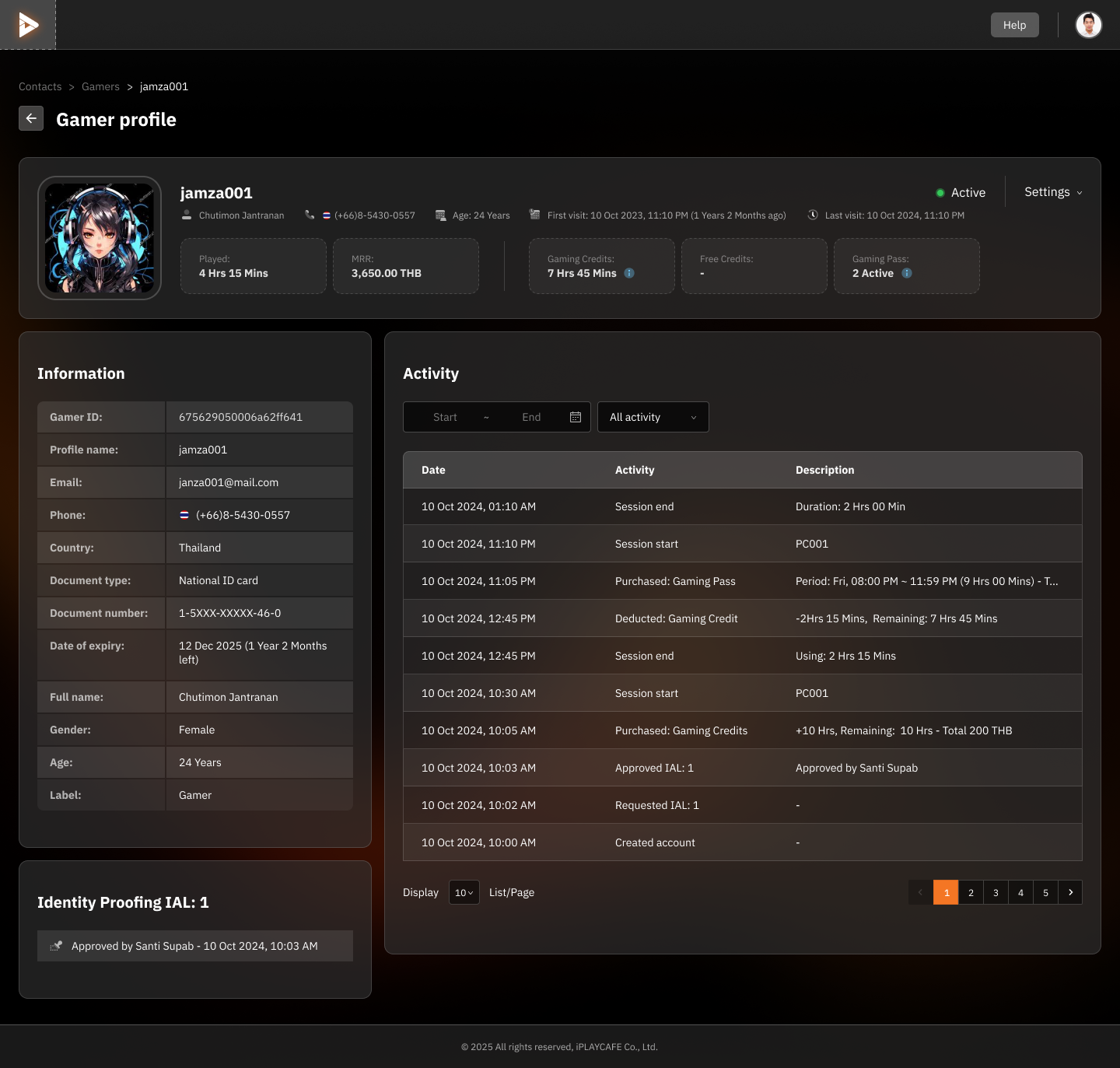
Profile Details
Profile Picture and Customer Name: Displays the customer's profile picture and name (editable in the Settings menu).
General Information:
Full Name: e.g., Chutimon Jantranran
Phone Number: e.g., (+66) 8-5430-0557
Age: e.g., 24 years old
Account Status: Active or Suspended
Usage Information:
Total Played Time: e.g., 4 Hrs 15 Mins
MRR (Monthly Recurring Revenue - Total Spending): e.g., 3,650.00 THB
Remaining Gaming Credit and Gaming Pass
Information Panel
Gamer ID: Unique customer ID
Personal Information:
Profile Name
Email
Document Number
Document Expiration Date
Gender and Age
Label: Customer type, such as Gamer or Guest
Identity Proofing History:
Displays identity verification history, e.g., Approved by Santi Supab
Activity Panel
Search Activity: Can filter data by time period and activity type, such as login or Gaming Pass purchase.
Activity Details:
Date and Time
Activity Performed: e.g., Purchased Gaming Pass
Additional Details: e.g., usage duration, credit deduction
Settings
Click the Settings icon to:
Edit customer information
Suspend or reactivate the account
Update additional details
Additional Actions:
Use the Activity section to analyze user behavior.
Check the status and identity proofing history to enhance security.
Guest Profile Information
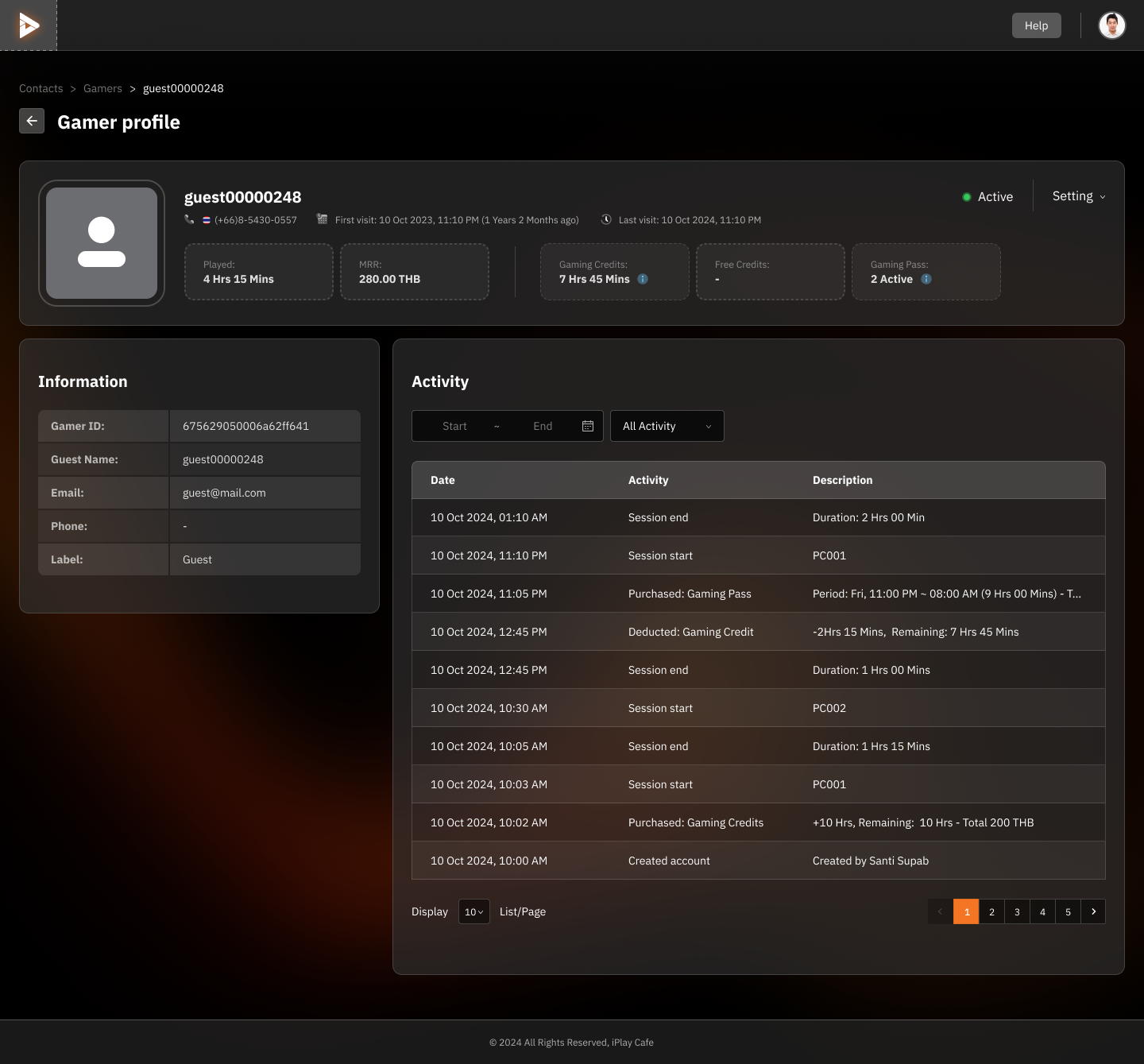
Profile Details
Profile Picture and Guest Name: Displays a picture (default is blank) and profile name, such as guest00000248.
General Information:
Phone Number (if available): e.g., (+66)-5430-0557
Total Spending (MRR): e.g., 280.00 THB
Played Time: e.g., 4 Hrs 15 Mins
Remaining Gaming Credit: e.g., 7 Hrs 45 Mins
Active Gaming Passes: e.g., 2 Active
Information Panel
Gamer ID: Unique user identifier, e.g., 675629050006a62ff641
Basic Information:
Guest Name (Profile Name)
Email (if available)
Phone Number (if available)
Account Type: Guest
Activity Panel
Search Activity:
Set the time period and filter by activity type, such as session start or Gaming Pass purchase.
Activity Details:
Date and Time of Activity: e.g., 10 Oct 2024, 11:10 PM
Activity: e.g., Purchased: Gaming Pass
Additional Details: e.g., time remaining or time used.
Settings
Click Settings to:
Update guest information
Suspend account usage
Add additional information as needed.
Additional Actions:
Use the activity section to analyze behavior and improve the user experience.
Check the remaining Gaming Credit and Gaming Passes to plan promotions or add-on services for guests.
Was this helpful?
Still need help? Ask the team