Gamer Profile
Member User Profile Details
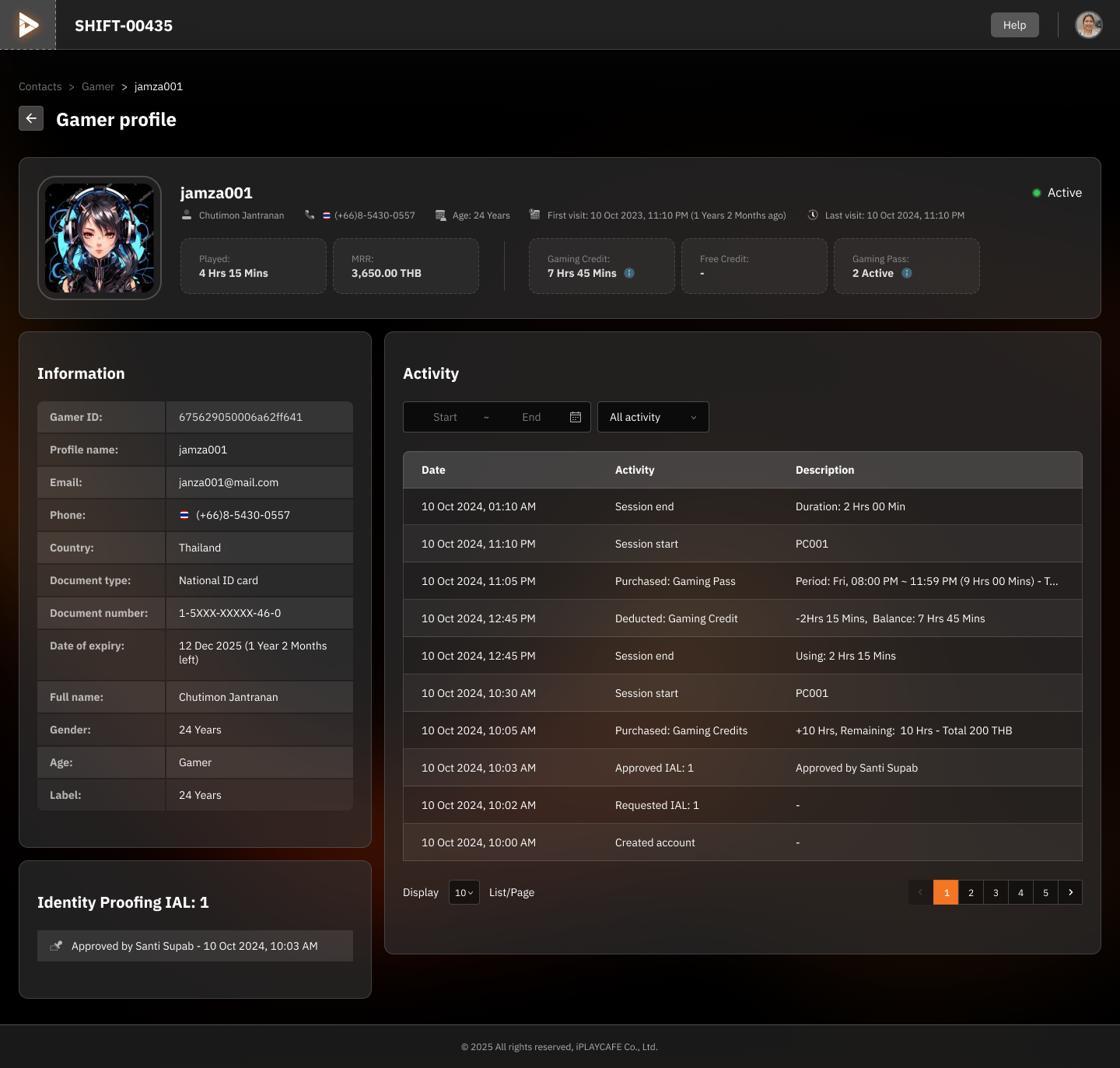
1. Gamer Profile Header
Header of the screen displaying the profile picture and key summary information about the Gamer.
2. Information (Personal Details)
Displays additional information about the user, such as identity document type or expiration date.
3. Activity
Displays the Gamer's usage history, with relevant columns:
Example Activities:
Session start on PC001
Purchased Gaming Credit (+10 Hrs)
Filtering:
Activities can be filtered by date or activity type, such as All activity, Purchased, Deducted.
4. Identity Proofing
Section displaying the user's identity verification.
5. Real-World Usage
Check Usage History: Such as Session start and end times.
Verify Credits or Gaming Passes: To see how much usage rights the user has left.
Track Identity Verification: To confirm that the user has been approved.
Was this helpful?
Still need help? Ask the team