Contacts (Gamer)
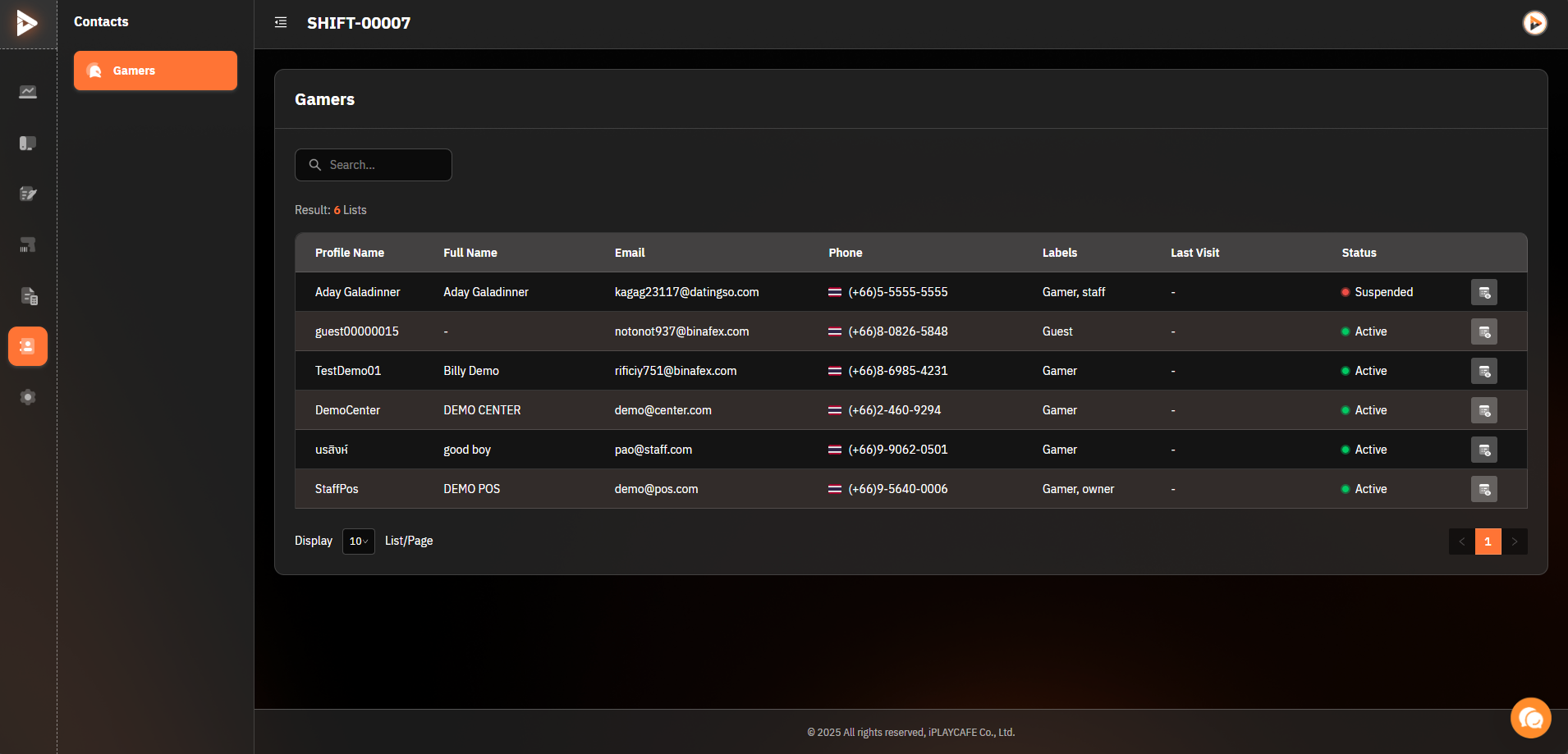
This page displays a list of users (Gamers) related to the system, including personal information and usage status, such as Profile Name, Email, Status, etc.
1. Table Components
Profile Name: User account name in the system (e.g., jamza001).
Full Name: User's full name (e.g., Chutimon Jantranan).
Email: User's email (e.g., janza001@mail.com).
Phone: Phone number (e.g., (+66) 8-5430-0557).
Labels: User type (e.g., Gamer, Guest, Staff).
Last Visit: Date and time of the user's last visit (e.g., 12 Jan 2024, 09:09 AM).
Status: Account status (e.g., Active, Suspended).
2. Table Usage
Example:
Profile Name: jamza001
Full Name: Chutimon Jantranan
Email: janza001@mail.com
Phone: (+66) 8-5430-0557
Labels: Gamer
Last Visit: 12 Jan 2024, 09:09 AM
Status: Active
Profile Name: jamza001 is the user name assigned by the system.
Labels: Shows the role, e.g., Gamer means a regular player.
Status: Active means the account is in use, and Suspended means the account is suspended.
3. Search Bar
The search bar at the top of the screen is used to find specific users, e.g., search by Profile Name, Email, Phone, etc.
Usage:
Type the information to search for, e.g., jamza001.
Press the Enter key or the search icon. The system will display related results.
4. User Management
More Menu Button in Each Row
The icon at the end of each row (button ...) can be clicked to display additional menus:
View User Details: Review the Gamer's account information.
Edit User Information: Update information such as email or phone number.
Suspend or Unsuspend Account: Change the user's status from Active to Suspended or vice versa.
5. Display Adjustment
Adjust Items Per Page:
At the bottom of the screen, you can select the number of items to display per page, e.g., 10, 20, 50 items.
6. Real-World Usage
Verify Users with Issues: E.g., find users whose status is Suspended.
Track Usage Information: See which users have logged in most recently.
Update User Information: E.g., edit phone numbers or status.
Additional Tips
If a customer comes from another center, they must sign in at the client at least once. However, if it is a new registration at that specific shop, they can use it immediately.
Was this helpful?
Still need help? Ask the team