People Profile
People Profile
Displays the profile information of employees at the center, including activities and action history related to their accounts.
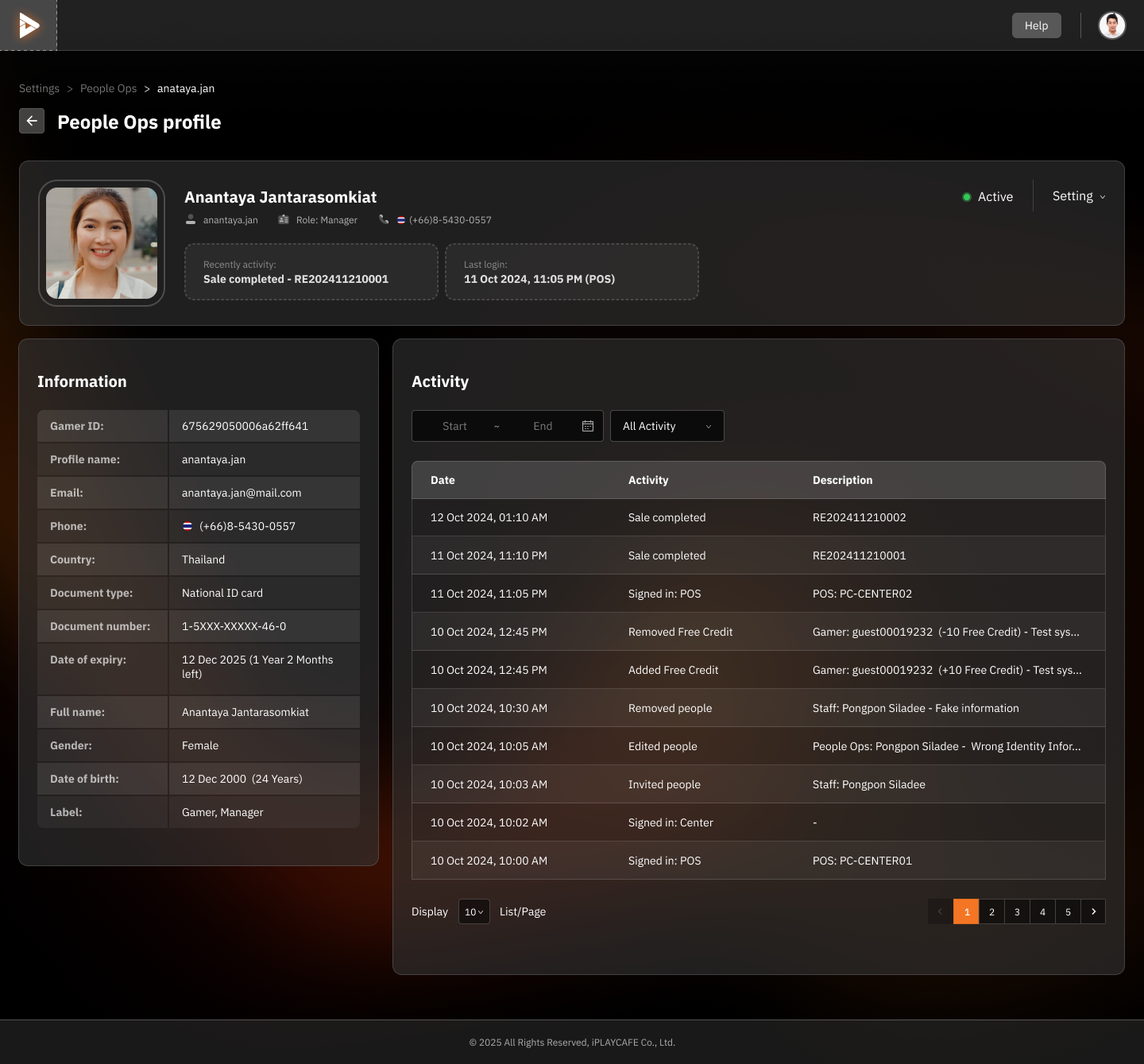
Information
Gamer ID: Employee/user ID.
Profile name: Profile name in the system.
Full name: Full name.
Email and Phone: Contact information.
Country: Registered country.
Document type & ID: Type of identity verification document, such as National ID card, with the document number.
Date of expiry: Document expiration date.
Gender and Date of Birth: Gender and date of birth.
Label: Position, such as Gamer, Manager, or Staff.
Activity
Displays all activity history, such as:
Sales completed
Signed in
Edited profile
Added/removed credits or managed member information
Activity Log:
Specifies date, time, activity, and detailed description.
Search filter by time period and activity type.
Status
Active: Account is in normal working condition.
Settings: Menu for managing account settings, such as editing information or suspending the account.
Usage
This screen is suitable for:
Managers or center owners who want to monitor employee performance.
Tracking activities related to employee responsibilities.
Editing incorrect information or confirming the accuracy of actions in the system.
Was this helpful?
Still need help? Ask the team