Invite People
Invite People
"Invite People" allows center managers to easily add people to the team and set detailed roles and access permissions.
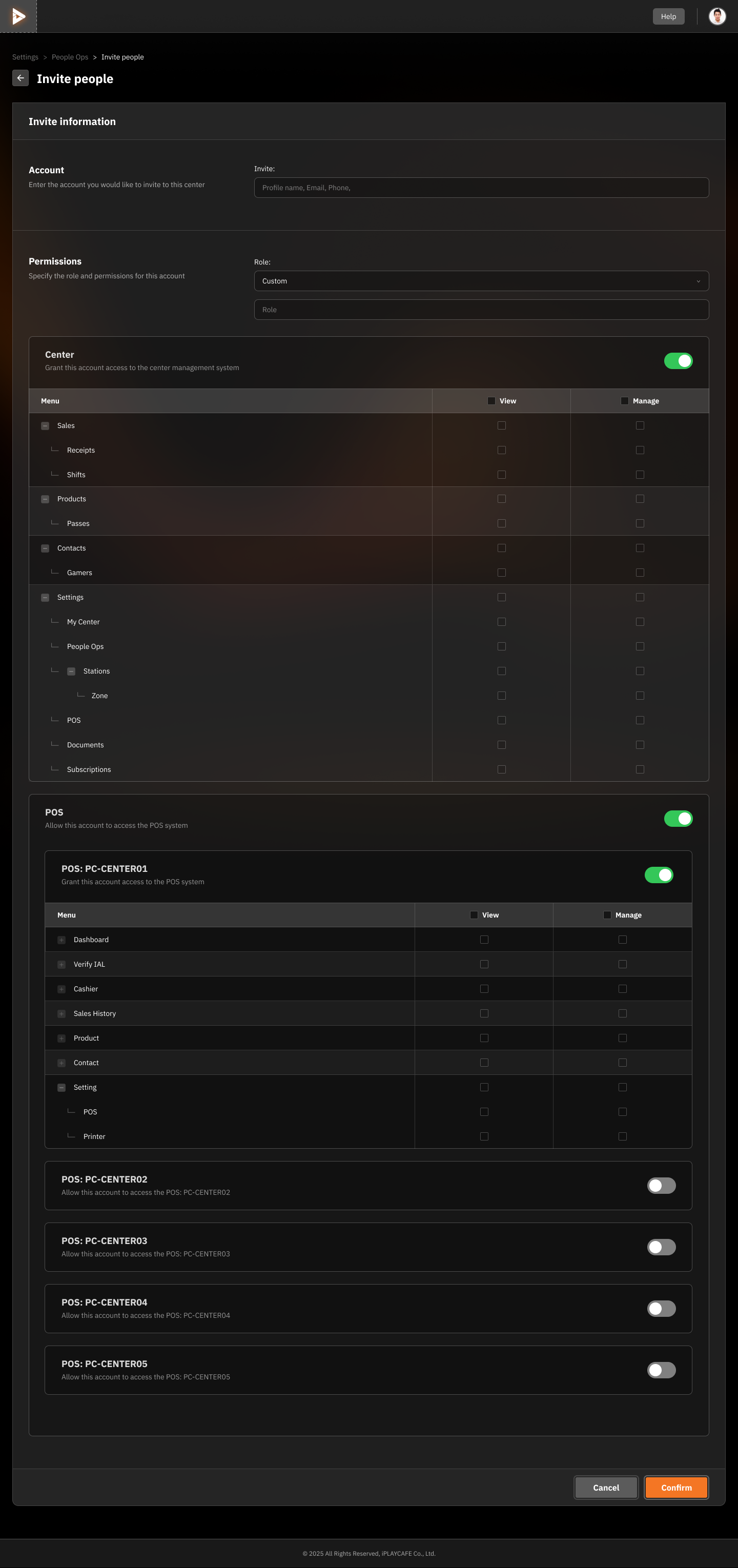
Invite Information
Account: Enter the account information of the person you want to invite (Profile name, Email, or Phone).
Role:
Select a predefined role such as Manager or Staff.
Create a Custom Role to define specific permissions.
Permissions:
Menu Access: Select the menu and access permissions for the invited account:
View: View data in the specified menu.
Manage: Manage or edit data in the specified menu.
Menu Options:
Sales: e.g., Receipts, Shifts
Products: e.g., Passes
Contacts: e.g., Gamers
Settings: e.g., My Center, People Ops
POS: e.g., Dashboard, Identity Proofing, Cashier
POS Access:
Enable or disable POS (Point of Sale) system access for various stores or branches.
Select the menus that can be accessed, such as:
Dashboard
Sales
Products
Printers
Invite Confirmation
Confirm Button: Confirm the invitation and save the settings.
Cancel Button: Cancel the invitation and return to the previous page.
Additional Tips:
Staff need to sign up for a "Gamer" membership first in order to invite others.
Was this helpful?
Still need help? Ask the team