People Ops
Settings - People Ops
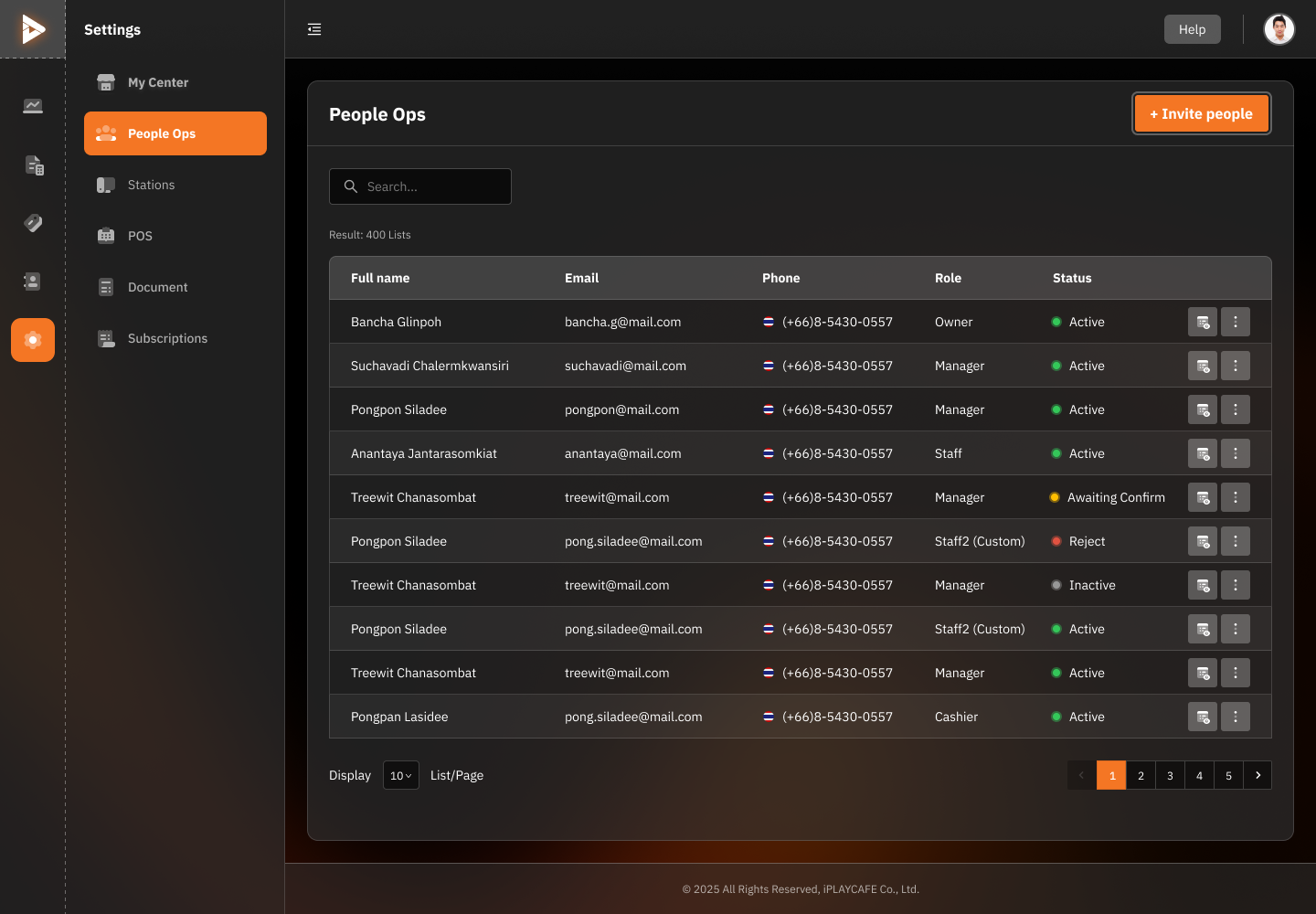
Displays information about employees at the service center, allowing detailed team member management.
Employee List Display
Full Name: Employee's full name.
Email: Contact email.
Phone: Phone number.
Role: Job role in the store or branch, such as Owner, Manager, Staff, or Custom Role.
Status: Account status, such as Active, Inactive, Awaiting Confirm, or Reject.
Employee Management Functions
Invite People Button: Used to add new employees by entering information and assigning roles.
Management Buttons (3-dot icon):
Edit: Edit employee information.
Deactivate/Activate: Change the account status.
Remove: Remove the employee from the system.
Custom Permissions: Assign specific access rights to employees.
Filtering and Search
A Search field is available to search for employees by name, email, or role.
You can select the number of items displayed per page (e.g., 10, 20, 50 items).
Employee Status
Active: Currently in use.
Awaiting Confirm: Pending confirmation.
Reject: Application rejected.
Inactive: Temporarily deactivated.
Was this helpful?
Still need help? Ask the team