Zone
Stations - Zones
Displays information about zones and the status of computers within the center, including details of each machine's usage.
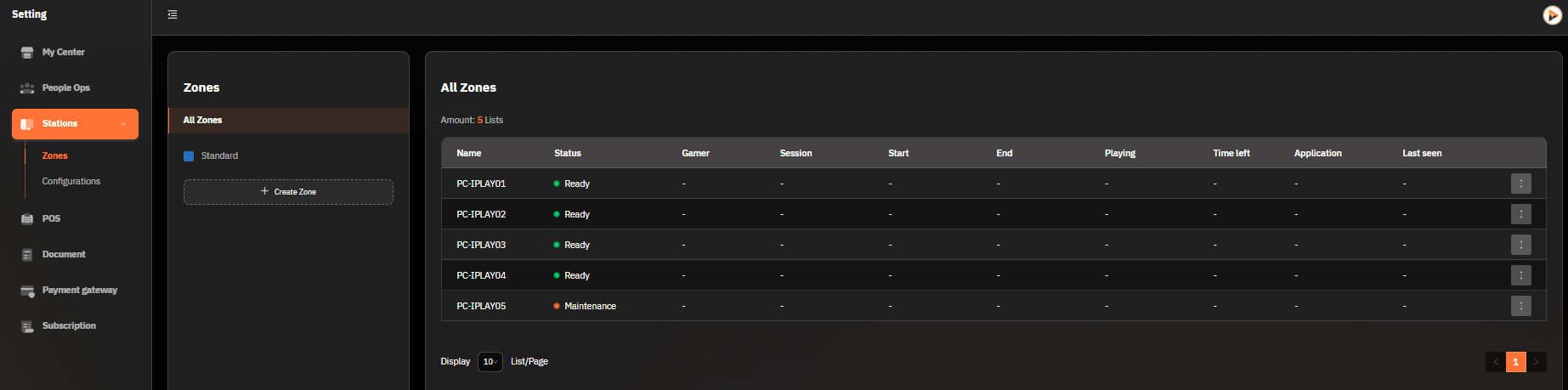
1. Zone Management
Zone Types:
Standard Zone
VIP Zone
Create Zone Button (+ Create Zone): Used to add a new zone for managing areas and resources within the center.
2. Computer Status Data Table
The table consists of:
Name: Computer name (e.g., PC-001, PC-002)
Status:
Ready: Available for use
Active: Currently in use
Gamer: The username of the person currently using the computer (e.g., jamza001)
Session: The name of the package being used (e.g., Gaming Pass: Night Pass)
Start and End: The start and end times of the session
Playing & Time Left: The elapsed time of use and the remaining time in the package
Application: The name of the application being used (e.g., FC Online)
Last Seen: The last time the computer was used
3. Usage
Suitable for:
System administrators or staff who need to monitor the usage status of computers in each zone.
Checking which machines are in use or ready for the next user.
Additional Functions:
Managing computer status through additional buttons (⋮) on the right side of each row in the table.
Was this helpful?
Still need help? Ask the team